
Linux and OS X Build Status: [](https://travis-ci.org/mazurwiktor/albion-online-stats)
Windows Build Status: [](https://ci.appveyor.com/project/mazurwiktor/albion-online-stats)
**Powered by pyaoaddons**  [](https://discord.gg/3U2rpyV)
Albion Online Stats
===================
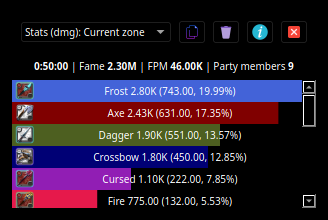
Albion online stats is an extension to MMORPG game - Albion Online. It tracks network traffic and displays various statistics, such as damage and DPS meter calculated from in-game actions.
# How to use this app
> **Note** this section does not require any coding knowledge. Those simple two steps are required to use this software :)
## Installation
1. On windows make sure that WinPcap is installed in your system. [Npcap 0.9983 installer for Windows Vista/2008, 7/2008R2, 8/2012, 8.1/2012R2, 10/2016 (x86 and x64)](https://nmap.org/npcap/dist/npcap-0.9983.exe) **Make sure to install with the "Install Npcap in WinPcap API-compatible Mode"**
2. Download latest release from https://github.com/mazurwiktor/albion-online-stats/releases/latest (.exe for windows .tar for linux and mac)
3. Enjoy :)
## Configuration
After first execution the app is going to create default configuration file named `albion-online-stats.cfg`. Feel free to edit it according to your needs.
## Is This Allowed
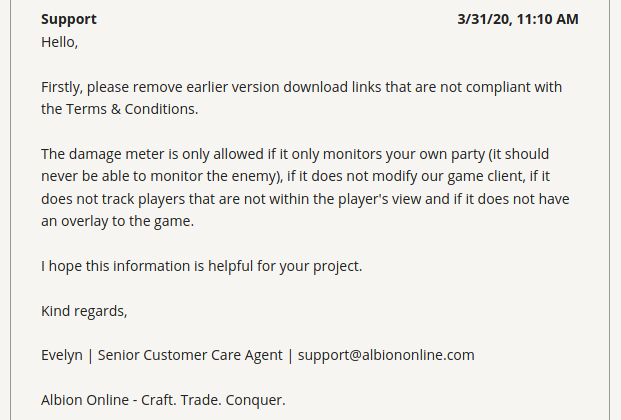
- [x] Only monitors your own party
- [x] Does not modify our game client
- [x] Does not track players that are not within the player's view
- [x] Does not have an overlay to the game
> **Note** this traits of the application are true from version 0.9.0+.
## Donate
[](https://www.patreon.com/wiktormazur)
# Getting started
## Prerequisites
- Python installed (python3.6 / python3.7 / python3.8)
- *Windows only prerequisites* https://github.com/libpnet/libpnet#windows
## All platforms
1. Clone repository:
```shell
git clone https://github.com/mazurwiktor/albion-online-stats.git
```
2. [optional] Create and activate python virtualenv
```shell
python -m venv env
[linux/mac] . env/bin/activate
[windows] .\env\Scripts\activate.ps1
```
or alternatively using conda and skip installing requirements step
```shell
conda env create --file environment.yml
conda activate albion
```
3. Install requirements
```shell
pip install -v -r requirements.txt
```
4. Run the application
```shell
[sudo on linux] python albion-online-stats.py
```
# Contribution
Check out [wiki page](https://github.com/mazurwiktor/albion-online-stats/wiki)
# License
Licensed under either of
* Apache License, Version 2.0, ([LICENSE-APACHE](LICENSE-APACHE) or http://www.apache.org/licenses/LICENSE-2.0)
* MIT license ([LICENSE-MIT](LICENSE-MIT) or http://opensource.org/licenses/MIT)
at your option.