[](https://pepy.tech/project/aostats)
**Powered by** **pyaoaddons** & **albion online addons**
> On Linux the app no longer depends on `pyaoaddons`: it ships a pure-Python
> Protocol18 decoder and captures packets directly through `AF_PACKET`
> (no libpcap needed). `pyaoaddons` is still used on Windows and macOS.
[](https://discord.gg/3U2rpyV)
Albion Online Stats
===================
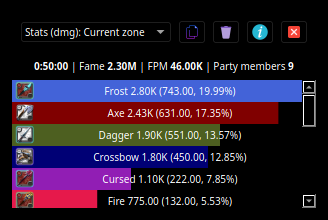
Albion online stats is an extension to MMORPG game - Albion Online. It tracks network traffic and displays various statistics, such as damage and DPS meter calculated from in-game actions.
## App preview
## Youtube live preview
[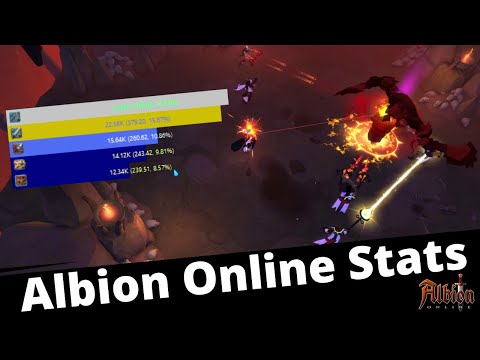](http://www.youtube.com/watch?v=Dy3YyherSmw "Albion online stats")
# How to use this app
> **Note** this section does not require any coding knowledge. Those simple two steps are required to use this software :)
## Installation
### Windows
1. Make sure that WinPcap is installed in your system. [Npcap 0.9983 installer for Windows Vista/2008, 7/2008R2, 8/2012, 8.1/2012R2, 10/2016 (x86 and x64)](https://nmap.org/npcap/dist/npcap-0.9983.exe) **Make sure to install with the "Install Npcap in WinPcap API-compatible Mode"**
2. Install python [all platforms installation instructions](https://docs.python.org/3/using/) or via [Microsoft Store](https://www.microsoft.com/en-us/p/python-39/9p7qfqmjrfp7).
3. Download the latest launcher from https://github.com/mazurwiktor/albion-online-stats/releases/latest (`albion-online-stats.bat`).
4. Enjoy :)
### Linux / macOS
1. Install python 3 and the `venv` module with your package manager. On macOS also install libpcap:
```shell
# Debian / Ubuntu
sudo apt install python3 python3-venv python3-pip
# Fedora
sudo dnf install python3 python3-pip
# Arch
sudo pacman -S python
# macOS
brew install libpcap
```
2. Capturing network traffic requires elevated privileges. Either run the app with `sudo`, or grant the Python interpreter the capabilities it needs:
```shell
sudo setcap cap_net_raw,cap_net_admin=eip "$(readlink -f "$(command -v python3)")"
```
The app can do this for you from the **Fix capture permissions** button in its error dialog.
3. Download the latest launcher from https://github.com/mazurwiktor/albion-online-stats/releases/latest (`albion-online-stats.sh`), make it executable and run it:
```shell
chmod +x albion-online-stats.sh
./albion-online-stats.sh
```
4. Enjoy :)
> **Note:** on macOS (and Windows) the packet capture backend (`pyaoaddons`) only ships prebuilt wheels for CPython 3.6-3.10. If you use a newer Python, `pyaoaddons` is not installed automatically and the app will report that the backend is missing. Either use Python 3.10 (or older) or build `pyaoaddons` from source (requires a Rust toolchain). This does not affect Linux, where the built-in decoder is used.
## Configuration
After first execution the app is going to create default configuration file named `albion-online-stats.cfg`. Feel free to edit it according to your needs.
## Debugging
Start the app with `--verbose` (or set `AOSTATS_VERBOSE=1`) to enable detailed logging of the app and the packet capture backend:
```shell
aostats --verbose
```
This prints the backend initialization result, the capture-permission probe, and every received game event to the terminal. On Windows/macOS the capture backend also writes its own log to `aoaddons.log` in the current working directory.
On Linux the app uses its own `AF_PACKET` capture and Protocol18 decoder; every interface it listens on and every decoded event is logged with `--verbose`.
To collect packet-discovery data for decoding new features such as silver and item pickup tracking, pass a JSONL log path:
```shell
aostats --verbose --log-path /tmp/aostats-discovery.jsonl
```
This writes raw UDP payloads, decoded Photon messages, translated game messages, emitted app events, and possible item-id annotations to the JSONL file. If `--verbose` is also set, normal app logs are written to `/tmp/aostats-discovery.jsonl.app.log`.
On Linux, when the app has no permission to capture packets the backend still reports successful initialization; the app detects this and shows a "Fix capture permissions" button regardless.
## Is This Allowed
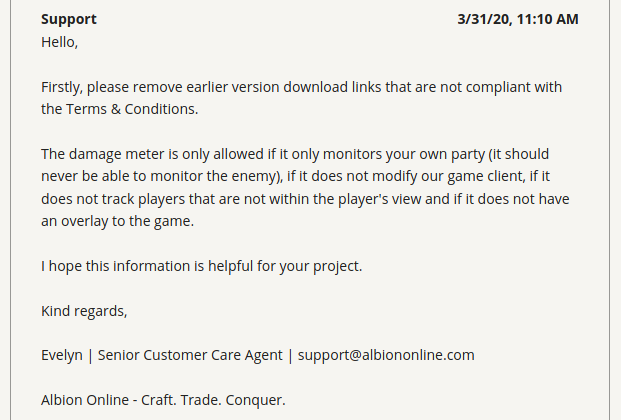
- [x] Only monitors your own party
- [x] Does not modify our game client
- [x] Does not track players that are not within the player's view
- [x] Does not have an overlay to the game
> **Note** this traits of the application are true from version 0.9.0+.
## Donate
[](https://www.patreon.com/wiktormazur)
# Getting started
## Prerequisites
- Python installed (python3.6+). On Linux the built-in decoder requires no extra runtime. On Windows/macOS use CPython 3.6-3.10 to get the `pyaoaddons` capture backend as a prebuilt wheel; newer versions require building it from source.
- *Windows only prerequisites* https://github.com/libpnet/libpnet#windows
- *macOS only prerequisites* libpcap (`brew install libpcap`)
## All platforms
1. Clone repository:
```shell
git clone https://github.com/mazurwiktor/albion-online-stats.git
```
2. [optional] Create and activate python virtualenv
```shell
python -m venv env
[linux/mac] . env/bin/activate
[windows powershell] .\env\Scripts\activate.ps1
[windows cmd.exe] .\env\Scripts\activate.bat
```
3. Install the package with pip (this also installs the dependencies).
On Linux this is all you need. On Windows/macOS, use Python 3.6-3.10 to get the `pyaoaddons` capture backend automatically.
```shell
python -m pip install .
```
On Windows/macOS with Python 3.11+ the capture backend is not installed
automatically. Either use a Python 3.6-3.10 interpreter, or build
`pyaoaddons` from source first:
```shell
pip install setuptools-rust
pip install --no-build-isolation git+https://github.com/mazurwiktor/aoaddons-python.git
python -m pip install ".[capture]"
```
4. Run the application
```shell
aostats
```
# Contribution
Check out [wiki page](https://github.com/mazurwiktor/albion-online-stats/wiki)
# License
Licensed under either of
* Apache License, Version 2.0, ([LICENSE-APACHE](LICENSE-APACHE) or http://www.apache.org/licenses/LICENSE-2.0)
* MIT license ([LICENSE-MIT](LICENSE-MIT) or http://opensource.org/licenses/MIT)
at your option.
