 Wiktor Mazur

Linux and OS X Build Status: 
Windows Build Status:

Albion Online Stats
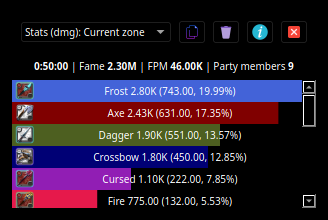
Albion online stats is an extension to MMORPG game - Albion Online. It tracks network traffic and displays various statistics, such as damage and DPS meter calculated from in-game actions.
Note
Network packet tracking and API for game events moved to other project. See Albion Online Addons
How to use this app
Note
this section does not require any coding knowledge. Those simple two steps are required to use this software :)
Installation
- On windows make sure that WinPcap is installed in your system. Npcap 0.9983 installer for Windows Vista/2008, 7/2008R2, 8/2012, 8.1/2012R2, 10/2016 (x86 and x64) Make sure to install with the "Install Npcap in WinPcap API-compatible Mode"
- Download latest release from https://github.com/mazurwiktor/albion-online-stats/releases/latest (.exe for windows .tar for linux and mac)
- Enjoy :)
Configuration
After first execution the app is going to create default configuration file named albion-online-stats.cfg. Feel free to edit it according to your needs.
Is This Allowed

- Only monitors your own party
- Does not modify our game client
- Does not track players that are not within the player's view
- Does not have an overlay to the game
Note
this traits of the application are true from version 0.9.0+.
Donate

Getting started
Prerequisites
- Python installed (python3.6 / python3.7 / python3.8)
- Windows only prerequisites https://github.com/libpnet/libpnet#windows
All platforms
-
Clone repository:
git clone https://github.com/mazurwiktor/albion-online-stats.git -
[optional] Create and activate python virtualenv
python -m venv env
[linux/mac] . env/bin/activate
[windows] .\env\Scripts\activate.ps1
or alternatively using conda and skip installing requirements step
conda env create --file environment.yml conda activate albion -
Install requirements
pip install -v -r requirements.txt -
Run the application
[sudo on linux] python albion-online-stats.py
Contribution
Check out wiki page
License
Licensed under either of
- Apache License, Version 2.0, (LICENSE-APACHE or http://www.apache.org/licenses/LICENSE-2.0)
- MIT license (LICENSE-MIT or http://opensource.org/licenses/MIT)
at your option.