

Powered by pyaoaddons & albion online addons
On Linux the app no longer depends on
pyaoaddons: it ships a pure-Python Protocol18 decoder and captures packets directly throughAF_PACKET(no libpcap needed).pyaoaddonsis still used on Windows and macOS.

Albion Online Stats
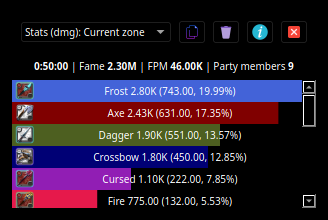
Albion online stats is an extension to MMORPG game - Albion Online. It tracks network traffic and displays various statistics, such as damage and DPS meter calculated from in-game actions.
App preview
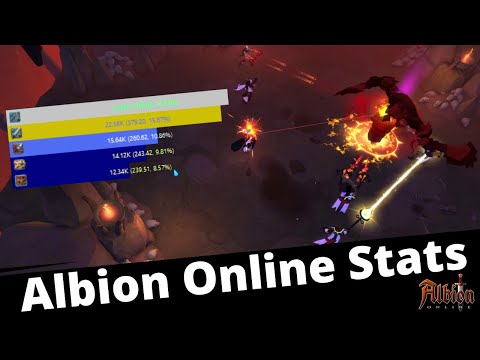
Youtube live preview
How to use this app
Note
this section does not require any coding knowledge. Those simple two steps are required to use this software :)
Installation
Windows
- Make sure that WinPcap is installed in your system. Npcap 0.9983 installer for Windows Vista/2008, 7/2008R2, 8/2012, 8.1/2012R2, 10/2016 (x86 and x64) Make sure to install with the "Install Npcap in WinPcap API-compatible Mode"
- Install python all platforms installation instructions or via Microsoft Store.
- Download the latest launcher from https://github.com/mazurwiktor/albion-online-stats/releases/latest (
albion-online-stats.bat). - Enjoy :)
Linux / macOS
-
Install python 3 and the
venvmodule with your package manager. On macOS also install libpcap:# Debian / Ubuntu sudo apt install python3 python3-venv python3-pip # Fedora sudo dnf install python3 python3-pip # Arch sudo pacman -S python # macOS brew install libpcap -
Capturing network traffic requires elevated privileges. Either run the app with
sudo, or grant the Python interpreter the capabilities it needs:sudo setcap cap_net_raw,cap_net_admin=eip "$(readlink -f "$(command -v python3)")"The app can do this for you from the Fix capture permissions button in its error dialog.
-
Download the latest launcher from https://github.com/mazurwiktor/albion-online-stats/releases/latest (
albion-online-stats.sh), make it executable and run it:chmod +x albion-online-stats.sh ./albion-online-stats.sh -
Enjoy :)
Note: on macOS (and Windows) the packet capture backend (
pyaoaddons) only ships prebuilt wheels for CPython 3.6-3.10. If you use a newer Python,pyaoaddonsis not installed automatically and the app will report that the backend is missing. Either use Python 3.10 (or older) or buildpyaoaddonsfrom source (requires a Rust toolchain). This does not affect Linux, where the built-in decoder is used.
Configuration
After first execution the app is going to create default configuration file named albion-online-stats.cfg. Feel free to edit it according to your needs.
Debugging
Start the app with --verbose (or set AOSTATS_VERBOSE=1) to enable detailed logging of the app and the packet capture backend:
aostats --verbose
This prints the backend initialization result, the capture-permission probe, and every received game event to the terminal. On Windows/macOS the capture backend also writes its own log to aoaddons.log in the current working directory.
On Linux the app uses its own AF_PACKET capture and Protocol18 decoder; every interface it listens on and every decoded event is logged with --verbose.
To collect packet-discovery data for decoding new features such as silver and item pickup tracking, pass a JSONL log path:
aostats --verbose --log-path /tmp/aostats-discovery.jsonl
This writes raw UDP payloads, decoded Photon messages, translated game messages, emitted app events, and possible item-id annotations to the JSONL file. If --verbose is also set, normal app logs are written to /tmp/aostats-discovery.jsonl.app.log.
On Linux, when the app has no permission to capture packets the backend still reports successful initialization; the app detects this and shows a "Fix capture permissions" button regardless.
Is This Allowed

- Only monitors your own party
- Does not modify our game client
- Does not track players that are not within the player's view
- Does not have an overlay to the game
Note
this traits of the application are true from version 0.9.0+.
Donate

Getting started
Prerequisites
- Python installed (python3.6+). On Linux the built-in decoder requires no extra runtime. On Windows/macOS use CPython 3.6-3.10 to get the
pyaoaddonscapture backend as a prebuilt wheel; newer versions require building it from source. - Windows only prerequisites https://github.com/libpnet/libpnet#windows
- macOS only prerequisites libpcap (
brew install libpcap)
All platforms
-
Clone repository:
git clone https://github.com/mazurwiktor/albion-online-stats.git -
[optional] Create and activate python virtualenv
python -m venv env [linux/mac] . env/bin/activate [windows powershell] .\env\Scripts\activate.ps1 [windows cmd.exe] .\env\Scripts\activate.bat -
Install the package with pip (this also installs the dependencies). On Linux this is all you need. On Windows/macOS, use Python 3.6-3.10 to get the
pyaoaddonscapture backend automatically.python -m pip install .On Windows/macOS with Python 3.11+ the capture backend is not installed automatically. Either use a Python 3.6-3.10 interpreter, or build
pyaoaddonsfrom source first:pip install setuptools-rust pip install --no-build-isolation git+https://github.com/mazurwiktor/aoaddons-python.git python -m pip install ".[capture]" -
Run the application
aostats
Contribution
Check out wiki page
License
Licensed under either of
- Apache License, Version 2.0, (LICENSE-APACHE or http://www.apache.org/licenses/LICENSE-2.0)
- MIT license (LICENSE-MIT or http://opensource.org/licenses/MIT)
at your option.